+32 460 23 96 44

On this page
- Best Jewelry CAD Software Compared
- Comparison: Paid vs Free CAD Software
- Software Compatibility and Installation
- Support and Updates
- Things to Consider when choosing CAD software
- Can Jewelers with Little Technical Knowledge Use CAD Software Themselves?
- Working with Jewelry CAD Experts
- What Questions Should a Jeweler Ask When Hiring a CAD Software Expert?
- How to Know If They’re the Right Fit:
- Empower Precision and Creativity with the Right Jewelry CAD Software
- Jewelry Modeling and Rendering at JewelExperts.com
RhinoGold is the most preferred CAD software among many jewelers—but that doesn’t mean it’s the perfect fit for everyone. Each jeweler has unique needs when it comes to 3D modeling and rendering. What works for one business might not align with another’s style, budget, or workflow.
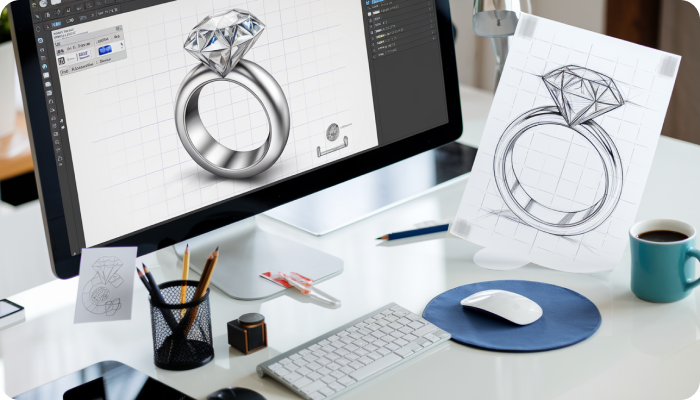
Jewelry design has evolved significantly with technology. One of the most transformative tools in the industry today is CAD software—short for Computer-Aided Design. For jewelers and designers, CAD software allows the creation of highly detailed jewelry models, precise and customizable designs in a digital format before production begins. This guide will explore the best CAD software currently available on the market for the creation of high-end models.
Best Jewelry CAD Software Compared
1. RhinoGold
Type: Paid
Best For: Professional jewelers and advanced users
Platform: Windows
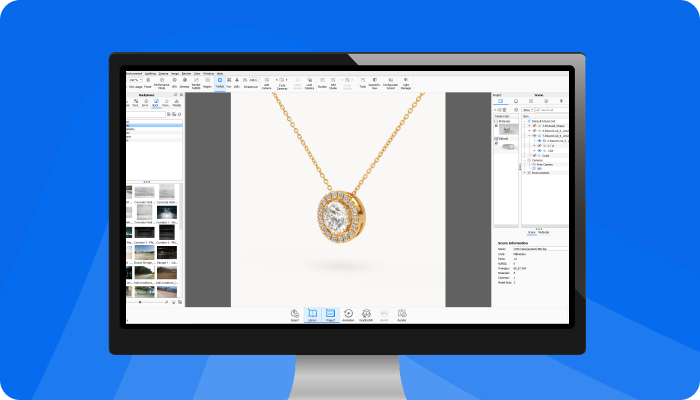
RhinoGold is a powerful CAD tool developed specifically for jewelry professionals. It is built on the Rhino 3D platform and provides specialized features such as gemstone libraries, engraving tools, and real-time rendering. It is widely used by high-end jewelers for its precision and extensive customization capabilities.
2. MatrixGold
Type: Paid
Best For: Advanced jewelers, retail studios, and design houses
Platform: Windows
MatrixGold is an advanced CAD software combining the best features of RhinoGold and Matrix. It offers parametric design capabilities, meaning changes to a model automatically update associated elements. It is ideal for creating complex, custom pieces and managing repetitive design tasks efficiently.
3. JewelCAD
Type: Paid (Trial available)
Best For: Freelancers and small jewelry businesses
Platform: Windows
JewelCAD is known for its user-friendly interface and simplicity. It is suitable for beginners and small businesses who want to transition from manual to digital design. It supports basic modeling, rendering, and stone-setting features without a steep learning curve.
4. 3Design CAD
Type: Paid
Best For: Jewelers focused on customization and rendering
Platform: Windows and macOS
3Design CAD is tailored for jewelry and watch design. It supports realistic rendering, parametric modeling, and cloud-based saving. It is a preferred choice for jewelry retailers who require high-quality visuals and client-friendly design presentations.
5. Firestorm CAD
Type: Paid
Best For: Jewelry manufacturers and production-focused studios
Platform: Windows
Firestorm CAD is developed with manufacturing in mind. It includes advanced features like pavé simulation, setting design tools, and production-ready outputs. Its interface is designed for both creative professionals and technical production teams.
6. TinkerCAD
Type: Free
Best For: Students and beginners
Platform: Browser-based (no installation required)
TinkerCAD is a beginner-friendly modeling tool by Autodesk. Although it is not designed specifically for jewelry, it serves as a good starting point for understanding basic 3D modeling. It is ideal for educational use and personal projects.
7. Blender (with Jewelry Add-ons)
Type: Free and open-source
Best For: Tech-savvy users and designers exploring advanced 3D modeling
Platform: Windows, macOS, Linux
Blender is a professional-grade 3D design tool. While not built for jewelry, it supports jewelry design with the use of custom scripts and plugins. It is best suited for users with some prior experience in CAD or 3D design.
Gints Zilbalodis, a Latvian filmmaker, made history by winning the Oscar for Best Animated Feature with his film Flow, crafted entirely using Blender, a free and open-source animation tool. Jewelers can take inspiration from this and start using Blender to design detailed, high-quality 3D models of rings, pendants, and more. With creativity and the right skills, Blender opens the door to professional-level jewelry design—without the cost..
Top Blogs To Read: How to choose and compare 3D CAD Software for jewelry design?
Comparison: Paid vs Free CAD Software
Paid software is generally better suited for professional and business use, while free software can be useful for learning or exploring the basics.
Software Compatibility and Installation
Most professional CAD tools for jewelry are available only on Windows. However, some options like 3Design and Blender offer macOS support. Cloud-based software like TinkerCAD works directly in the browser, making it compatible with most operating systems.
Ensure your computer has the following minimum requirements:
At least 8GB RAM
A dedicated graphics card
A multi-core processor
Stable internet for cloud services
Interface and Learning Curve Comparison
Beginners are advised to start with simpler tools like JewelCAD or TinkerCAD and gradually move to advanced platforms like RhinoGold or MatrixGold.
Support and Updates
Software like MatrixGold and 3Design offer regular updates and access to official customer support. Free tools rely on community forums and online documentation. When choosing a software tool, ensure it is actively maintained and supported to avoid long-term issues.
Things to Consider when choosing CAD software
Starting your journey in jewelry CAD (Computer-Aided Design) can feel overwhelming at first, but with the right approach, it becomes much easier. Here are a few helpful things to keep in mind if you’re just beginning:
1. Pick Software with Beginner-Friendly Tutorials
Choose a CAD program that offers step-by-step tutorials, guides, or video lessons. These resources will help you understand the basics and give you the confidence to start designing on your own.
2. Try Free or Trial Versions First
Before you invest in paid software, try out the free versions or take advantage of trial periods. This way, you can explore the features and see if the software suits your needs without spending money upfront.
3. Look for a Simple and Clean Interface
As a beginner, it’s best to choose software with a user-friendly interface. Avoid tools that are too complex or filled with unnecessary features. Focus on finding one that offers essential design tools in a simple layout.
4. Join Online Communities or Forums
Being part of a community can make a big difference. Look for online forums, social media groups, or learning communities where other CAD users share tips, solve problems, and support each other.
5. Consider Taking Help from a Professional
If you find it hard to get started on your own, consider working with a professional CAD designer or instructor. A few training sessions can help you learn faster and avoid beginner mistakes
Can Jewelers with Little Technical Knowledge Use CAD Software Themselves?
Yes — but with the right mindset, tool, and training.
Not every jeweler needs to be a full-fledged CAD expert, but having basic knowledge can significantly improve communication with designers, reduce dependency, and speed up custom orders. Here’s what jewelers with less technical experience should know:
Start with Beginner-Friendly Tools - Softwares like TinkerCAD, Blender (with jewelry add-ons), or even JewelCAD offer relatively easier learning curves. They don’t require advanced technical skills and are good for experimenting with shapes, styles, and concepts.
Invest in Short Online Training - Several CAD software providers offer basic tutorials, certification courses, and step-by-step learning modules. Platforms like YouTube, Udemy, and LinkedIn Learning have beginner-level training, especially for JewelCAD, Rhino, and MatrixGold.
Focus on Modifying, Not Modeling - You don’t have to create complex designs from scratch. Many tools let you edit pre-made templates, adjust ring sizes, replace gemstones, or tweak existing models to suit client preferences.
Use It for Client Visualization - Even basic knowledge helps you generate renders for customers or quickly visualize custom requests before handing it over to a professional designer for final production files.
Collaborate Smarter - When you understand how CAD works—even at a basic level—you can communicate design changes clearly, give faster feedback, and reduce back-and-forth time with external CAD experts.
Bottom Line:
If you’re a jeweler with limited CAD knowledge, you can still explore these tools at your own pace. You don’t need to be an engineer—just someone curious and creative. Start small, use beginner-friendly software, and grow from there.
Working with Jewelry CAD Experts
Handling all these technical tools and software can feel overwhelming — especially if you're not from a tech background. But don’t worry, you're not alone. There are plenty of resources like YouTube, Google, and even tools like ChatGPT that can help you learn at your own pace.
Still, if technology feels too much to handle or you’re short on time, there’s no harm in reaching out to professionals. In fact, it can be a smart move. Here are three key benefits of seeking professional help:
1. Saves Time and Effort
Instead of spending hours figuring things out on your own, professionals can get the job done faster and more efficiently.
2. Ensures Quality Work
Experts know the best tools, practices, and strategies. Their experience can help you avoid costly mistakes and get high-quality results.
3. Gives You Peace of Mind
When professionals handle the technical side, you can focus on what you do best — whether it’s designing jewelry, running your business, or building customer relationships.
So, if things get too confusing, don’t hesitate to ask for help. It’s not a weakness — it’s a wise choice. Professional guidance can reduce errors, save time, and help you achieve better results in your jewelry design projects.
Believe in the work of experts. Here’s a case study showing the results Jewelexperts.com achieved for one of its major clients.
Read the case study: Transforming Jewelry Presentation: Grand Diamonds' Success with 3D Jewel Hub
What Questions Should a Jeweler Ask When Hiring a CAD Software Expert?
Choosing the right CAD expert is just as important as selecting the right software. A skilled CAD designer ensures your jewelry designs are not only visually stunning but also technically accurate and production-ready. If you're a jeweler looking to outsource CAD design, here are the most relevant questions you should ask before hiring:
1. Which CAD software are you proficient in?
2. Can you share your portfolio of jewelry designs?
3. Do you create files optimized for 3D printing or casting?
4. How do you handle gemstone settings in your models?
5. Can you make design adjustments based on weight or metal cost requirements?
6. How do you ensure your designs are manufacturable?
7. How many revisions are included in your service?
8. Are you able to follow hand-drawn sketches or 2D references?
9. Which file formats do you deliver (e.g., STL, 3DM, OBJ)? Can I own the files?
10. Can you work within tight deadlines or on urgent projects?
How to Know If They’re the Right Fit:
They explain things simply without making you feel overwhelmed.
They listen to your needs instead of pushing their own style.
They’re experienced with fine jewelry, not just generic 3D design.
They’re open to feedback and revisions, especially if you're new to CAD.
Hiring the right agency should feel like gaining a creative partner who respects your vision and fills in the technical gaps. Start with a small project or trial to see how they work before committing long-term.
Empower Precision and Creativity with the Right Jewelry CAD Software
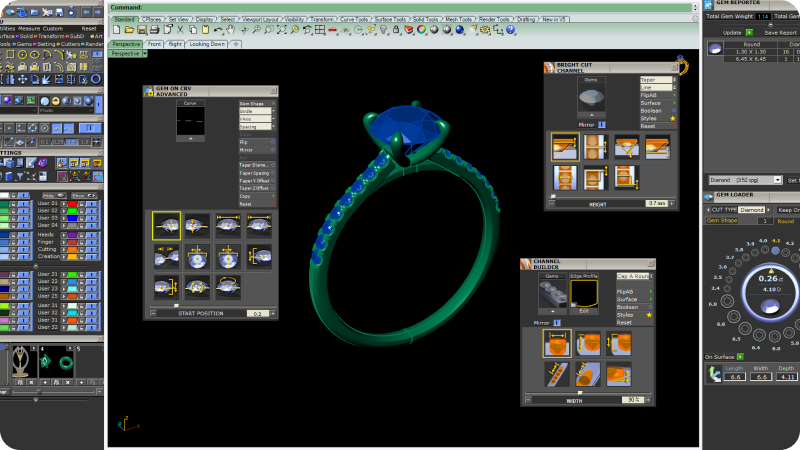
Jewelry CAD software has become essential for modern designers. It enhances creativity, improves precision, and simplifies communication with clients and manufacturers. The best CAD software for you depends on your level of expertise, design goals, and budget.
For beginners, options like JewelCAD and TinkerCAD are ideal. For professionals, MatrixGold, RhinoGold, and 3Design offer powerful tools tailored to jewelry production.
To ensure the best results and save time, consider seeking expert guidance from professionals such as Jewelexperts.com. They can help you learn, select the right tools, and deliver high-quality digital models ready for production.
Jewelry Modeling and Rendering at JewelExperts.com
Want to take your jewelry visuals to the next level? Now’s the perfect time!
JewelExperts.com can help you present your designs with realistic jewelry modeling and rendering.
Why work with JewelExperts.com?
High-quality 3D visuals that make your products stand out
Perfect for websites, social media, and marketing materials
Professional service with quick turnaround
Give your jewelry designs the attention they deserve.
Visit JewelExperts.com to book a free consultation.