+32 460 23 96 44

On this page
- MEASURING THE SUCCESS OF E-MAIL MARKETING
- What Is an Email Open Rate and How Is It Calculated?
- The Average Email Open Rate?
- The best time to send your Emails
- How to Get More Emails Delivered
- Tips to Send an Email That People Actually Open
- 1. Improve Your Email Deliverability
- 2. Optimize for Mobile (Most People Use Phones)
- 3. Write a Strong Subject Line and Use a Recognizable Sender Name
- 4. Choose Words That Work (And Avoid Those That Don’t)
- 5. Segmentation Works (and Why You Should Start Now)
- Final Takeaways
- Boost Your Campaign Performance with ease!!
- Intresting Reads
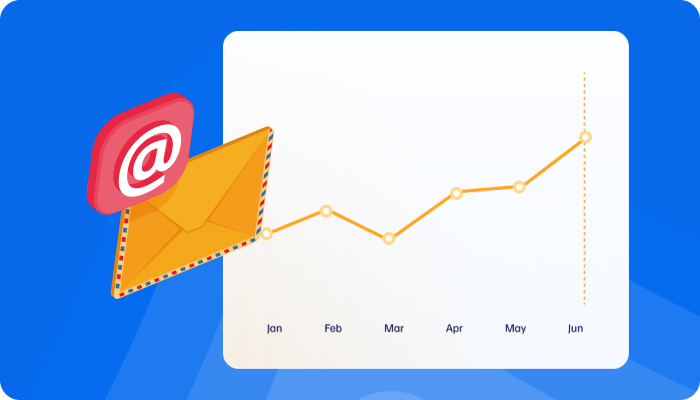
In today’s fast-moving digital world—where new technologies pop up every day, social ads change overnight, and AI tools are everywhere—email marketing still holds its ground. It's not outdated. In fact, it’s one of the most reliable channels when it comes to driving real business results.
How powerful is it?
Well, email marketing should ideally contribute at least 25% of your total revenue. And if done right, it can do even more.
But how do you know your email strategy is working?
Let’s start with the basics: your email open rate.
The open rate tells you how many people opened your email out of the total number it was sent to. It’s the first sign that your email caught someone’s attention—so it matters more than you think. If no one opens your email, nothing inside it matters—no matter how great your content or offer is.
That’s why we recommend aiming for an open rate of at least 40%. It’s a strong benchmark that shows your emails are reaching the right people with the right message. Once you hit that number consistently, you can build on it—by implementing the things we are going to discuss today.
MEASURING THE SUCCESS OF E-MAIL MARKETING
If you're measuring the success of your email marketing, you're likely tracking two key numbers:
Open Rate – how many people opened your email
Click-Through Rate (CTR) – how many people clicked on a link inside it
Most marketers focus heavily on CTR, but here’s the catch: no one can click unless they first open the email. So, improving your open rate is step one if you want your email campaigns to work better.
Let’s explore how to do that.
What Is an Email Open Rate and How Is It Calculated?
At first glance, an open rate sounds simple: how many people opened your email? But technically, it’s counted only if:
The reader enables images to load
Or clicks on a link inside the email
Your open rate = (Number of Opens / Number of Delivered Emails) × 100
Example:
You send 100 emails → 10 bounce → 90 are delivered
If 10 people open your email, your open rate is 11%
Bounced emails don’t count in this calculation, because if they’re never delivered, they can’t be opened.
The Average Email Open Rate?
Email open rates change over time. Here’s a quick snapshot:
2015 to 2018: stayed around 24%
2020: dipped slightly to 21.3%
This doesn’t mean email marketing is losing power. Historically, open rates fluctuate—but usually bounce back. So don’t panic over short-term drops. Instead, focus on improving your numbers.
The best time to send your Emails
Best Day:
Studies show Tuesday is the best day to send emails, especially for B2B audiences.
Best Time:
10 AM: People have settled into work and start checking emails
1 PM: Post-lunch catch-up on inboxes
Also, 23% of email opens happen within the first hour of delivery. After 24 hours, the chances of being opened drop to under 1%. So, timing matters more than you might think.
If you’re looking for a safe bet: Send your emails on Tuesday after 1 PM.
How to Get More Emails Delivered
Before someone can open your email, it needs to land in their inbox. But over 20% of emails never make it.
Deliverability also varies by region:
Europe: 86% inbox rate
Asia: 66% inbox rate
Tips to Send an Email That People Actually Open
Getting someone to open your email isn’t luck—it’s strategy. Let’s break down the essentials:
1. Improve Your Email Deliverability
Before you worry about open rates, ask yourself: Is my email even reaching inboxes?
Deliverability is the foundation. Without it, even the best email will sit unseen in spam folders.
Here’s how to improve it:
Use double opt-in - Don’t assume someone wants your emails just because they filled out a form. A double opt-in confirms their interest by asking them to verify via email. This builds a cleaner, more engaged list.
Ask subscribers to whitelist your email address - A simple post-signup message can request users to add you to their contacts. This reduces your chances of being flagged as spam.
Clean your list regularly - Remove inactive contacts who haven’t opened or engaged with your emails in months. These addresses lower your sender reputation and hurt deliverability.
2. Optimize for Mobile (Most People Use Phones)
Over 80% of people open emails on their phones, yet only 20% of companies actually optimize emails for mobile. If your email doesn’t look good on a small screen, it may be deleted in seconds. Here’s how to make your emails mobile-friendly:
Use a responsive design that adapts to different screen sizes
Keep subject lines short so they don’t get cut off
Avoid large images or tiny fonts that are hard to read
Always test your email on both mobile and desktop before sending
Mobile users are quick to swipe away. If your email isn’t instantly readable, you’ve likely lost them.
3. Write a Strong Subject Line and Use a Recognizable Sender Name
When your email lands in someone’s inbox, two things influence whether they’ll open it:
Who it’s from
What the subject line says
Sender Name - According to research:
45% of readers decide to open an email based on the sender's name
Using a personal sender name (e.g., Roger from XYZ) can increase open rates by 35%
Yet surprisingly, 89% of campaigns still go out with just a company name. That’s your opportunity to stand out—make it personal.
Subject Line Best Practices - A great subject line is concise, relevant, and clear. Here’s what works:
Use 6 to 10 words — the sweet spot for open rates
Keep it under 90 characters, especially for mobile readers
Personalize it, like including the reader’s first name. It improves open rates by around 2%). The key? Relevance. Don’t just add “Hi Roger” and expect magic—your subject line must give people a reason to care.
Creative Examples That Work
You can also get creative with pop culture references. Subject lines with movie titles or song lyrics perform well—some see up to a 26% open rate.
Examples:
“Imagine all the people…” Get free shipping today
Also, subject lines that include the word “video” often see an increase in opens by about 6%.
4. Choose Words That Work (And Avoid Those That Don’t)
The language you use in your subject line can trigger engagement or spam filters. According to research:
Words that perform well:
“Secrets”
“E-sales”
“Awesome”
Words to avoid:
“Confirm”
“Features”
“Upgrade”
These are frequently reported as spam-triggering words.
Other things to avoid:
Too many question marks (?) or hashtags (#) in your subject lines—these reduce trust and lower open rates
Emojis in subject lines - Despite their popularity, studies show that emojis don’t help open rates and may even create negative sentiment
5. Segmentation Works (and Why You Should Start Now)
If you want better results for SEO from your emails, segmentation is a smart move. It simply means dividing your email list into smaller groups based on things like interests, location, or past purchases. This helps you send more relevant messages—and people are more likely to open them.
You don’t have to do it all at once. Start small. Try segmenting your list by:
What your customers are interested in
Where they live
What they’ve bought before
How often do they engage with your emails?
Even simple changes like these can make a big impact on your email performance.
Final Takeaways
Want people to open your emails? Start with these small but powerful steps:
Keep your subject lines short – Aim for 6 to 10 words
Send emails on Tuesdays after 1 PM – It’s when most people check their inboxes
Use a real sender name – “Roger from XYZ” works better than just “XYZ Company”
Make sure your email looks good on mobile – Over 80% of people read emails on their phones
Avoid spammy words – Skip terms like “confirm,” “upgrade,” or too many symbols (!, ?, #)
Segment your list – Send the right message to the right group
Skip the emojis – They often don’t help and can turn people off
Boost Your Campaign Performance with ease!!
Final Thoughts
Improving your email open rates doesn’t require big changes—just smart ones. Email marketing still works—but only when done right. Ready to take the next step? Let the experts at JewelExperts.com help you turn good emails into great ones.
Read more: Ultimate Guide: Building a Brand Identity for Your Jewelry Business 101
Boost Your Campaign Performance with ease!!

Don’t get overwhelmed by all the marketing tasks—let the professionals take care of it for you. At JewelExperts.com Marketing Hub, we help jewelry businesses grow and shine in the digital world. Whether it’s email marketing, PPC, SEO, or content, our track record speaks for itself.
In today's market, standing out is more than just good copy—visuals matter more than ever. Did you know that:
Emails with high-quality visuals see up to 65% higher open rates?
People remember 80% of what they see, but only 20% of what they read?
That's where traditional styles fall short—they often can’t deliver the visual quality your campaign needs. To truly impress and convert, you need 3D-rendering, hyper-realistic visuals that capture attention in a split second.
Our 3D rendering and modeling service turns your jewelry designs into lifelike images.
Perfect for email marketing, social media ads, or even your website—these visuals are built to perform and engage.
So, if you're ready to level up your marketing and make your emails worth opening, reach out to JewelExperts.com today.
Let’s build something stunning together.
Intresting Reads
Why Jewelry Brands Should Use 3D Renders for Social Media Marketing